

30 January 2026
Kia ora whānau,
Welcome to South Wellington Intermediate School for 2026!
We are very much looking forward to the start of Term 1 next week and can’t wait to welcome you all to our school community.
As we begin the year together, I am excited to be joining you in what promises to be a year full of opportunity for our students and their families. Intermediate schooling in Aotearoa New Zealand offers a unique and dynamic educational experience, and South Wellington Intermediate School is no exception. Our dedicated staff are committed to providing a safe, welcoming environment that reflects our vision: Challenge. Engage. Inquire. Inspire.
On a personal note, I have greatly appreciated the warmth and support shown to me by staff so far. As principal, I am excited to be part of the SWIS community and look forward to meeting you all at our pōwhiri.
Our website has a lot of information that will help you understand how things work at SWIS.
Have a great last weekend of the holidays and we look forward to seeing everyone next week!
Ngā mihi nui,
Brendon Henderson
Tumuaki | Principal
Remember to check out the school’s Facebook Page, which has great news stories about what’s happening at school.
Term 1 Dates
- 2 Feb – Meet the Teacher
- 2 Feb – Second-hand uniform sale
- 3 Feb – Returning Y8s Day
- 4 Feb – Pōwhiri and full day of school for all students
- 6 Feb – Waitangi Day, school closed
- 11 Feb – SWIS Whānau BBQ & Camp information Session 5:30pm
- 27 Feb – Staff Only Day
- 8 March – SWIS Kapa haka & Poly Club performing at Newtown Festival
- 28 March – SWIS Kapa haka performing at Cupa Dupa
- 2 April – Last day of Term 1
Note: Easter is in the April School Holidays
2026 School Terms | Holidays
- Term 1 – 9 weeks | 4 Feb – 2 April
- Public holiday: Waitangi Day – Friday 6 February, school closed
- Staff Only Day – 27 Feb
- Term Break: Friday 3 April to Sunday 19 April (includes public holidays: Good Friday 3 April, Easter Monday 6 April, Easter Tuesday 7 April – a school holiday).
- Term 2 – 11 weeks | 20 April – 3 July
- Public holiday: Anzac Day – Observed Monday 27 April, school closed
- Public holiday: King’s Birthday – Monday 1 June, school closed
- Term Break: Saturday 4 July to Sunday 19 July (includes public holiday: Matariki – Friday 10 July)
- Term 3 – 10 weeks | 20 July – 25 Sept
- Term Break: Saturday 26 September to Sunday 11 October
- Term 4 – 10 weeks | 12 Oct – 17 Dec
- Public holiday: Labour Day – Monday 26 October, school closed
- Summer Break: Saturday 18 December
School Notices
Important dates for the start of 2026
2 February (Monday): Meet the Teacher & Second-hand Uniform Sale
Meet the Teacher is an opportunity primarily for new students and whānau to meet with their homeroom teacher. Students are welcome to wear either their school uniform or non-uniform to this meeting. A booking link for these meetings will be emailed to you. If your child is in Room 9, you are welcome to book a time with Eseta Uini through Hero.
This 15-minute meeting for our new students gives them the opportunity to:
- find out which room they will be in,
- learn how the class operates, and
- get to know the homeroom teacher.
Second-hand uniform items can be purchased for a koha on Monday, 2 February. Signage in the bottom court will direct you to the new Library space, which will be open from 9am – 3pm for second-hand uniform purchases. Please bring your own bag.
3 February (Tuesday): Returning Year 8’s day
Year 8 students will be onsite (in uniform) for a leadership day. School starts at 8:45am.
4 February (Wednesday): Pōwhiri – all students
All students must be at school by 8:45 am, wearing the correct green school uniform. The day will begin with a pōwhiri in the Hall. Please put your bags in your classroom then head down to the Hall for our official welcome. After the pōwhiri, students will go with their teacher and classmates for the remainder of the day, while parents are invited to the staffroom to share kai.
5 February (Thursday): Homeroom day
All students are at school. Students may arrive from 8:30am through the gates into the playground. Homeroom teachers are in their classrooms to welcome students from this time. The school day starts at 8:45 with the roll, notices and karakia. We expect all students to be in their homerooms by 8:45 am.
6 February (Friday): Waitangi Day – School will be closed.
11 February (Wednesday): SWIS Whānau BBQ & Camp information Session 5:30pm
Bring the whānau and join us for a BBQ where you will be able to chat to staff members and meet other families. Everyone is welcome to join us.
Class Placements and location
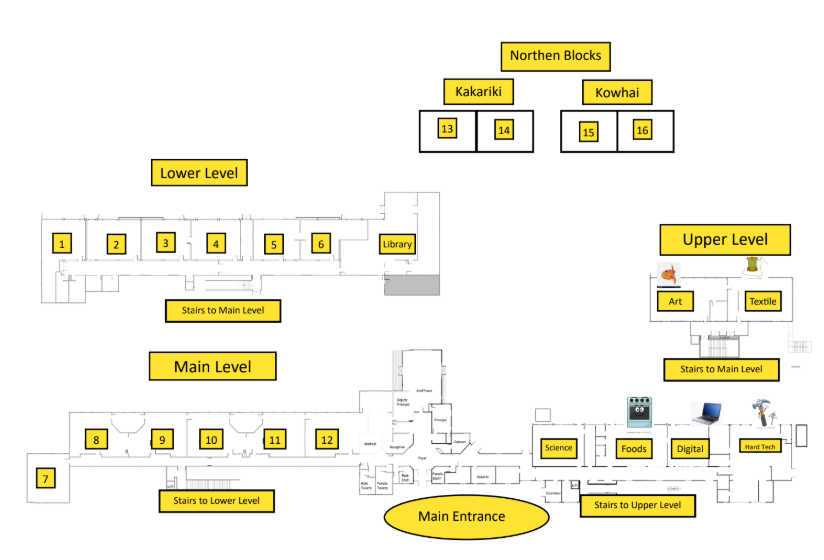
Room Changes
| Room 2026 | Previously Room | Homeroom Teacher |
| 1 | 5 | Stephen Moli |
| 2 | 11 | Rebecca Amos |
| 3 | 10 | Hannah Quince |
| 4 | 12 | Alex Radovanovic |
| 8 | 3 | Alida Middlebrook |
| 9 | 13 | Eseta Uini |
| 10 | 18 | Nadia Abdul Syafieq |
| 11 | 2 | Morgan Jamieson |
| 12 | 1 | Josh Hinman |
| 13 | 20 | Greg Kyle |
| 14 | 14 | Cole Hangfling |
| 15 | 15 | Aaron Kling |
| 16 | 19 | Kelly Bush |
School Communication, Payments & Permissions
A reminder that SWIS uses the HERO Student Management system for parent communication, payments and permission. We encourage all parents to sign up. Please follow the link provided for instructions.
Uniform
A reminder that all students are expected to wear the SWIS school uniform. Uniforms can be purchased directly from NZ Uniforms or through the second-hand uniform sale on 2 February 2026.
Also a reminder that all students must wear a wide-brimmed hat in Terms 1 and 4 when outside, particularly during breaks. Students are welcome to wear a hat from home, or SWIS sunhats are also available from the Uniform Shop at a reasonable cost.
Stationery
This year we have three options for stationery partners and we encourage you to choose what works best for your needs. Alternatively, the list is on our school website.
- OfficeMax MySchool website – https://www.myschool.co.nz/swis
- Quizzle School Packs team – https://schoolpacks.co.nz/south-wellington-intermediate/
- Warehouse Stationary – https://www.warehousestationery.co.nz/lists/search#searchType=schoollists-search-form&schoolId=B000023272
Bring Your Own Device (BYOD)
SWIS is a BYOD school, and students are strongly encouraged to bring devices to school to assist with their learning. You will be asked to sign a user agreement before students can use ICT here at SWIS.
Opportunities will always be provided for those students who do not have a device, with classrooms having a small supply of Chromebooks for student use.
If you are considering purchasing a device for use at school then we recommend that you read the information on the Netsafe website as they are helpful in ensuring that devices are as safe as possible.
What device should students have? We recognise that students are only at SWIS for 2 years so parents should also take into account any requirements that potential Secondary schools may have if you are buying a brand new device.
SWIS recommends Chromebooks for student use. They are good value for money, reliable and support the apps that are used at SWIS.
BYOD Devices should have:
- A screen greater than 10”
- Be WIFI capable (recommend WiFI N minimum)
- A working battery with a rated 6-hour use
- A keyboard
- Up to date operating system and antivirus software
- Must be able to run Google Chrome
Road safety around SWIS
Please ensure your child is aware of the importance of using designated crossings (either light-controlled or zebra crossings) when travelling to and from school. Even when using these crossings, it’s essential that they always check both ways for vehicles and cyclists before proceeding.
We also ask that parents ensure their children wear helmets to school if scooting or biking.
Sun safety in Term 1
All ākonga must wear a hat outside in Term 1 & 4 and we recommend that they apply sunscreen in the morning. Staff monitor hat use in break times and ākonga without a hat will be asked to stay in the shade.
School Camp
School camp provides a fantastic opportunity for students—who all arrive from different schools—to build new friendships and settle into our school community. It is also a valuable chance for teachers to get to know their students in a setting outside the classroom, helping to foster strong, positive relationships from the beginning of the year. This year we will be going to Forest Lakes Camp – see more information about our school camps here on our website.
| Forest Lakes | Rooms | Dates |
| Camp 1 | Room 2 – Rebecca Amos Room 9 – Eseta Uini Room 15 – Aaron Kling | Departs: Monday, 2 March Returns: Wednesday, 4 March |
| Camp 2 | Room 1 – Stephen Moli Room 3 – Hannah Quince Room 8 – Alida Middlebrook | Departs: Wednesday, 4 March Returns: Friday, 6 March |
| Camp 3 | Room 4 – Alex Radovanovic Room 12 – Josh Hinman Room 13 – Greg Kyle | Departs: Monday, 9 March Returns: Wednesday, 11 March |
| Camp 4 | Room 10 – Nadia Abdul Syafieq Room 11 – Morgan Jamieson Room 14 – Cole Hanfling Room 16 – Kelly Bush | Departs: Wednesday, 11 March Returns: Friday, 13 March |
We need parent support to make these Camps happen and would ask that if you are willing to attend that you please download and print a Police Vetting Form here and return it to the school office with suitable Photo ID as soon as possible. See more details here on the Whānau Admin page of our website. Note If you have already been police vetted by SWIS in the past two years then this does not have to be done again.
Quizzle School Packs team – https://schoolpacks.co.nz/south-wellington-intermediate/
SWIS Kapa Haka & Poly Club set to perform at Cupa Dupa and Newtown Festivals!
Get these dates in your diaries and come along to support our Kapa Haka and Poly Club Groups!
8 March at Newtown Festival
Kapa: https://www.newtownfestival.org.nz/kapa-haka-o-te-kura-o-te-hautonga-kapa-kakariki/
Poly: https://www.newtownfestival.org.nz/20774-2/
28 March at Cupa Dupa
On the Ngā Toi O Te Aro Stage from 12pm
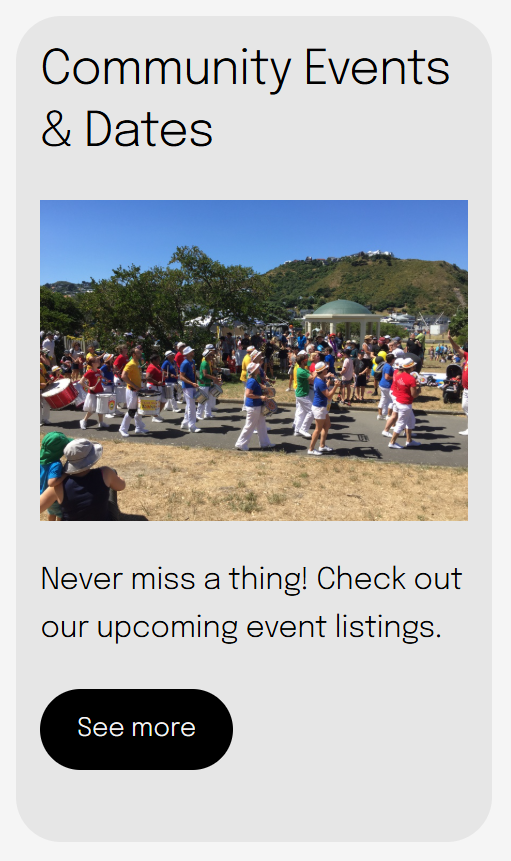
Community Events
Check out what’s on in our area!
Click on the links below to visit the South Coast information website with all the local events and activities on offer.